
Oracle Backup Script
Oracle Local RMAN Backup Helper
Overview
The Oracle Local RMAN Backup Helper is a Windows Batch utility designed to automate Oracle database backups using RMAN and local disk storage.
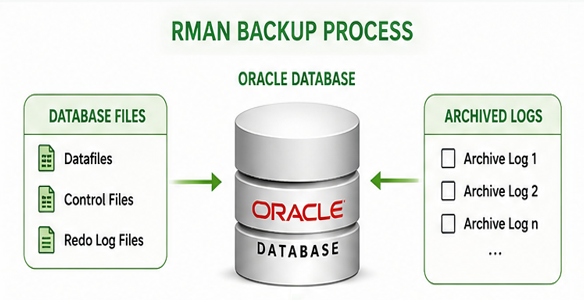
The script supports multiple backup modes, including FULL, INCR, ARCH, and COLD backups. It dynamically generates RMAN command files, configures backup retention, manages archived logs, creates control file and SPFILE backups, and writes detailed execution logs.
This utility is intended for Oracle DBAs who need a simple, repeatable, and scheduled backup process without manually writing RMAN commands for every execution.
Main Features
Automated Oracle RMAN backup execution.
- Supports multiple backup types:
- FULL backup
- Incremental Level 1 backup
- Archived log backup
- Cold full database backup
- Dynamic RMAN command file generation.
- Compressed backupset creation.
- Automatic backup tagging using date, time, SID, and backup mode.
- Local disk backup destination support.
- Automatic backup directory creation.
- RMAN retention policy configuration.
- Backup optimization enabled.
- Control file autobackup enabled.
- SPFILE backup included.
- Current control file backup included.
- Archived log backup support.
- Archived log deletion management.
- RMAN crosscheck operations.
- Expired backup cleanup.
- Obsolete backup cleanup.
- Recovery window configuration.
- Optional RMAN recovery catalog support.
- Recovery interval reporting based on archived log backups.
- Windows Task Scheduler examples included.
- Detailed backup execution logging.
Supported Backup Modes
FULL
Performs an RMAN Incremental Level 0 database backup, including archived logs.
This backup represents the base backup used for future incremental recovery operations.
Main actions:
- Backup database as compressed backupset.
- Backup archived logs.
- Delete archived logs after successful backup.
- Backup current control file.
- Backup SPFILE.
- Crosscheck backups and archived logs.
- Delete expired and obsolete backups.
INCR
Performs an RMAN Incremental Level 1 backup.
This backup captures database changes since the last Level 0 backup and is used to reduce backup size and backup duration.
Main actions:
- Backup database incremental level 1.
- Backup archived logs.
- Backup current control file.
- Backup SPFILE.
- Crosscheck backup metadata.
- Cleanup expired and obsolete backup records.
ARCH
Performs an archived log backup only.
This mode is useful for frequent archived log protection between database backups.
Main actions:
- Backup all archived logs.
- Backup current control file.
- Backup SPFILE.
- Crosscheck archived logs.
- Delete archived logs already backed up according to the configured policy.
COLD
Performs a cold full database backup.
The script shuts down the database, starts it in mount mode, executes the full backup, and then opens the database again.
Main actions:
- Shutdown database immediately.
- Startup database in mount mode.
- Backup full database and archived logs.
- Backup current control file.
- Backup SPFILE.
- Open database after backup completion.
Backup Retention and Cleanup
The script uses a configurable retention period.
Default value:
RETENTION = 15 days
During execution, the script can:
- Remove old log files.
- Remove old backup files.
- Delete expired RMAN backups.
- Delete expired archived logs.
- Delete obsolete backups based on the RMAN recovery window.
- Delete archived logs already backed up to disk.
This helps keep the backup destination controlled and avoids unnecessary disk usage growth.
Archived Log Management
The script includes logic to manage archived logs intelligently.
For FULL backups, archived logs are backed up and deleted after successful backup.
The script also checks available space on the archive/FRA disk. If free space is below the configured threshold, archived logs are automatically backed up with deletion enabled.
This helps prevent archive destination saturation and reduces the risk of database interruption caused by a full archive log location.
RMAN Configuration
The generated RMAN command file configures:
- Retention policy.
- Backup optimization.
- Default device type as disk.
- Control file autobackup.
- Control file autobackup format.
- Disk channel format.
- Compressed backupsets.
- Backup copies for datafiles and archived logs.
- Maximum backup piece size.
- Archived log deletion policy.
The script allocates multiple disk channels to improve backup performance.
Generated Output
Each execution produces:
RMAN Command File
A temporary RMAN command file is generated dynamically based on the selected backup mode.
It contains all RMAN configuration, backup, crosscheck, cleanup, and reporting commands.
Execution Log
A detailed log file is generated under the backup log directory.
The log includes:
- Backup mode.
- Oracle SID.
- Backup tag.
- RMAN execution output.
- Backup cleanup actions.
- Archived log recovery interval.
- RMAN incarnation list.
- Backup validation/reporting output when enabled.
Recovery Interval Report
After the RMAN backup, the script queries Oracle backup metadata to identify the available archived log recovery range.
The report includes:
- Minimum archived log SCN available.
- Maximum archived log SCN available.
- Minimum archived log time available.
- Maximum archived log time available.
This information is useful when planning Point-in-Time Recovery and validating available recovery coverage.
Recovery Catalog Support
The script supports both:
- RMAN NOCATALOG mode.
- RMAN Recovery Catalog mode.
When catalog mode is enabled, the script connects to the configured RMAN catalog database and can perform catalog resynchronization during FULL backup operations.
Benefits
- Simplifies Oracle backup operations.
- Provides consistent and repeatable RMAN backups.
- Reduces manual scripting effort.
- Supports scheduled backup automation.
- Protects database files, archived logs, control file, and SPFILE.
- Helps control backup storage usage.
- Provides backup and recovery visibility through logs.
- Supports both local and catalog-based RMAN environments.
- Useful for lab, development, disaster recovery, and production-like environments.
Requirements
- Oracle Database.
- RMAN.
- SQL*Plus.
- Windows Server.
- Local disk backup destination.
- Oracle environment configured for the target SID.
- Appropriate SYSDBA permissions.
- Optional RMAN Recovery Catalog.
Version Highlights
- FULL, INCR, ARCH, and COLD backup modes.
- Compressed backupsets.
- Automatic archived log backup and cleanup.
- Automatic control file and SPFILE backup.
- Retention-based cleanup.
- RMAN crosscheck and obsolete backup deletion.
- Recovery interval reporting.
- Windows Task Scheduler examples.
- Optional recovery catalog support.
