
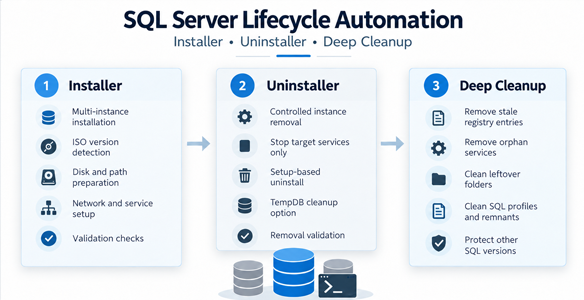
SQL Server Installation, Uninstallation & Deep Cleanup Automation.
This PowerShell automation suite provides a controlled framework for managing the full Microsoft SQL Server installation lifecycle, from clean multi-instance deployment through controlled removal and post-uninstall deep cleanup.
The solution separates installation, uninstallation and deep cleanup into three dedicated scripts. This keeps each operation focused while maintaining consistent validation, version awareness, safety checks, logging and protection of other SQL Server versions already installed on the host.
The framework is particularly useful in test, migration, rebuild, and validation scenarios where SQL Server instances need to be repeatedly installed, removed, and recreated. By separating the lifecycle into controlled stages, it reduces the risk of stale configuration, orphaned services, registry remnants, or leftover files affecting subsequent deployments.
The automation covers
- Automatic mounted SQL Server ISO detection and media version identification.
- Support for SQL Server 2019, 2022 and 2025.
- Multi-instance installation and uninstallation.
- Operating system compatibility validation.
- Preparation and validation of SQL Server binary, Data, Log, TempDB and Backup locations.
- SQL Server service, WMI namespace and instance-state validation.
- Controlled TCP/IP, Named Pipes and SQL Browser configuration.
- ISO-only installation with Microsoft Update and product update discovery disabled.
- Target-instance-only service shutdown before uninstall.
- File-lock validation before SQL Server Setup removal.
- Version-aware Setup Bootstrap detection for uninstall operations.
- Deep post-uninstall cleanup of registry entries, services, folders, profiles and shared remnants.
- Protection of other installed SQL Server versions and SQL Server Management Studio.
- Registry backup before destructive cleanup operations.
- Reboot-based deletion scheduling for locked SQL Server files when required.
- Check mode for reviewing remaining SQL Server objects before cleanup.
SQLServer_Installer.ps1
The installer automates SQL Server deployment from mounted media. It detects the SQL Server version, validates Windows compatibility, checks required disks and folders, prepares instance-specific storage paths, applies the standard network and service configuration, executes SQL Server Setup and validates the resulting installation.
Installer capabilities
- Automatic mounted ISO and setup.exe discovery.
- Automatic SQL Server major-version detection.
- Windows compatibility checks before Setup execution.
- Required disk validation and directory preparation.
- Separate user database Data, Log, TempDB and Backup paths.
- TCP/IP enabled and Named Pipes disabled by default.
- SQL Browser handled independently from the core Engine installation.
- Microsoft Update and SQL product updates disabled for controlled ISO-based deployment.
- WMI namespace validation and repair support.
- Post-install service and instance validation.
SQLServer_Uninstaller.ps1
The uninstaller performs controlled removal of selected SQL Server instances. It resolves the correct SQL Server version and Setup Bootstrap, stops only the services that belong to the target instance, validates that instance files are no longer locked, and then invokes SQL Server Setup for removal.
Uninstaller capabilities
- Instance-specific version and Instance ID detection.
- Automatic selection of the correct SQL Server Setup Bootstrap.
- Target-instance-only SQL Engine, Agent, Full-Text and telemetry service shutdown.
- Service PID handling when a target service does not stop normally.
- master.mdf and instance-file lock validation before Setup removal.
- Optional TempDB folder cleanup.
- Support for multiple requested instance removals.
- Protection of unrelated SQL Server instances.
SQLServer_CleanupRegistry.ps1
The cleanup script performs the final post-uninstall deep cleanup. It removes stale SQL Server objects that can remain after normal Setup removal, while keeping strict SQL-version isolation and protecting any SQL Server versions that are still installed.
Cleanup capabilities
- Target-version-aware registry cleanup.
- Removal of stale instance registrations and InstalledInstances entries.
- Removal of orphan SQL Server services and service registrations.
- Cleanup of SQL virtual-service Windows profiles.
- Removal of target-version instance folders and shared remnants.
- Cleanup of stale SQL Writer and SQL Browser remnants when no longer required.
- Removal of SQL Server 2012 Native Client when no SQL Server 2019-era dependency remains.
- Protection of other SQL Server versions during cleanup.
- Protection of SQL Server Management Studio.
- Registry backup before destructive changes.
- Rollback support for registry backups only.
- Locked-file detection and reboot-based deletion scheduling when required.
- Check mode for non-destructive inspection before cleanup.
Recommended workflow
- Installation: Mount the required SQL Server ISO, verify the configured instances and disks, and run SQLServer_Installer.ps1 as Administrator.
- Uninstallation: Select the SQL Server instance or instances to remove and run SQLServer_Uninstaller.ps1 as Administrator.
- Deep cleanup: Run SQLServer_CleanupRegistry.ps1 for the SQL Server version that was removed and review the detected objects before confirming cleanup.
- Restart: Restart Windows only when the cleanup reports that locked SQL Server files were scheduled for deletion.
- Reinstall or rebuild: After cleanup is complete, the server is ready for a fresh SQL Server installation using the installer script.
Important operational considerations
- The cleanup script is destructive and should only be used after the intended SQL Server instance or version has been uninstalled.
- Cleanup is strictly version-aware and must not remove objects belonging to a protected SQL Server version still installed on the host.
- Registry rollback does not restore deleted files or folders.
- A restart is required only when locked files or folders have been scheduled for deletion during boot.
- SQL Server Management Studio is intentionally preserved.
- Failed or partially removed SQL Server installations should be fully uninstalled and cleaned before attempting a fresh installation.
