
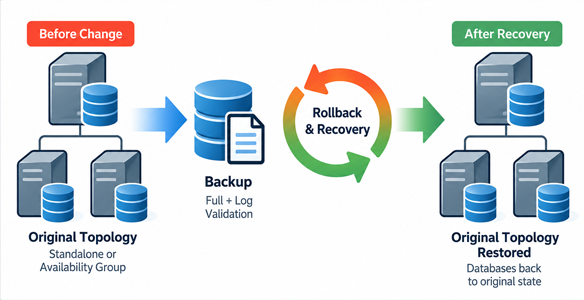
SQL Server Supported Rollback & Recovery – PowerShell-driven backup and recovery planning.
This PowerShell framework captures a per-database, pre-change topology baseline and generates a structured rollback and recovery procedure for SQL Server application updates. It supports standalone databases, Availability Group databases, and mixed environments, preserving the original database placement when the rollback plan is generated.
The utility automatically discovers local SQL Server instances and their replica topology, builds database-specific backup and restore commands, and produces a reviewable execution plan. Operators can use individual SQL scripts, a consolidated manual SQL reference, or a Windows HTA dashboard with separate controlled backup and rollback phases.
The tool generates the recovery procedure; it does not automatically perform a failover or roll back an application update when the plan is created. Executing the rollback phase is an explicitly destructive operation that requires a validated backup set, planned application downtime, and an appropriate change-control procedure.
The automation covers
- Automatic local SQL Server instance discovery, including instance-specific TCP connectivity and Availability Group topology.
- Discovery-only mode for inspecting the detected environment without generating a rollback plan.
- Per-database capture of the original standalone or Availability Group membership and replica layout.
- Support for mixed environments containing AG and non-AG databases on the same SQL Server nodes.
- Primary-node execution checks and protection against ambiguous or changed HA topology.
- Configurable database exclusions and protected persistence of the original baseline state.
- Full database backups and transaction log backups where applicable, with configurable compression and checksum.
- Backup verification using RESTORE VERIFYONLY before application changes and again before controlled rollback.
- AG data-movement suspension, removal of current AG membership, and cleanup of database copies on the relevant nodes.
- Restoration of the authoritative database and secondary copies, with file MOVE mappings and NORECOVERY on secondaries.
- Re-creation of the original AG membership and secondary joins for databases that belonged to an AG at baseline.
- Post-rollback SQL and Availability Group validation, plus per-step execution status and logging.
- Interactive Windows HTA dashboard, individual T-SQL files, and a consolidated SQL reference for manual review.
Key Capabilities
- Topology-Aware Baseline – Captures the original role, AG name, primary and secondary instances, recovery model, and database file layout. A database that was standalone at baseline remains standalone after rollback, even if it was added to an AG during the change.
- Primary Execution Safeguards – Requires a single unambiguous current PRIMARY Windows node in HA mode and prevents plan generation or controlled execution from a different node.
- Baseline Protection – Preserves the saved pre-change state between runs. The -RefreshState option is required to intentionally capture a new baseline.
- Backup and Verification – Generates FULL and, for FULL or BULK_LOGGED databases, LOG backup commands. Checks backup files with RESTORE VERIFYONLY before the change and before destructive rollback actions.
- Structured Rollback – Separates AG suspension and removal, primary and secondary cleanup, primary and secondary restore, AG re-registration, secondary join, and post-rollback validation into ordered steps.
- Controlled Execution – Provides distinct Backup and Rollback phases, SHA-256 checks for generated SQL files, prevention of concurrent controlled runs, step-by-step status, and stop-on-error behavior.
- Interactive and Manual Workflows – Generates a Windows HTA dashboard with execution controls alongside a static HTML plan and individual SQL scripts for DBA review and manual execution.
- Operational Logging – Records progress, warnings, failures, and execution status. Includes configurable retry and timeout behavior for secondary cleanup and AG join operations.
Rollback Workflow
- 01 – Pre-checks: Inspect instance, database, file, and Availability Group state.
- 02 – Backup: Create the baseline FULL and applicable transaction log backups on the authoritative instance.
- 03 – Verify Backups: Validate the generated backup set with RESTORE VERIFYONLY.
- Application update: Stop the application VMs or connections as required, confirm successful backups, then perform the application change under the established change procedure.
- 04 – Suspend: Suspend data movement for selected databases currently joined on secondary replicas.
- 05 – Remove from AG: Remove selected databases from their current Availability Group when applicable.
- 06 – Drop Primary: Drop the selected databases on the authoritative instance.
- 07 – Drop Secondary: Wait for AG-removal propagation and remove applicable secondary database copies.
- 08 – Restore Primary: Restore the saved rollback backups on the authoritative instance.
- 09 – Restore Secondary: Restore the same backup set to required secondary instances WITH NORECOVERY.
- 10 – Add to AG: Add restored primary databases that belonged to an Availability Group at baseline to their target AG.
- 11 – Join AG: Join prepared secondary database copies to the applicable Availability Group, with state checks.
- 12 – Post-validation: Review database states, replica configuration, and synchronization health before restarting the application.
Generated Files and Reporting
- RollbackPlan.html – Static HTML report containing the captured scope, execution sequence, generated scripts, and topology warnings.
- RollbackPlan.hta – Interactive Windows dashboard for launching generated steps, running controlled phases, and viewing execution status.
- 01–12 SQL files – Individual, instance-targeted pre-check, backup, verification, rollback, restoration, AG join, and validation scripts.
- 00_All_In_One.sql – Consolidated SQL reference for manual use. Its sections require switching to the exact server identified in each step; it is not a single-connection execution script.
- AOAGSupportedRollback-State.json – Saved pre-change database topology baseline protected from accidental replacement.
- Logs and status files – Per-step execution records, controlled-execution transcripts, and progress indicators.
- Backup files – FULL (.bak) and applicable transaction log (.trn) files stored under the configured backup root and instance-specific folder.
System Requirements
- Windows host with Windows PowerShell, permission to inspect local SQL Server instances, and network access to the discovered SQL Server nodes.
- SQL Server instances and, when applicable, configured Always On Availability Groups with an identifiable PRIMARY replica.
- SQL Server and Windows permissions sufficient to collect topology and execute the selected backup, restore, database, and AG operations.
- An accessible backup share with adequate storage capacity and read/write access for the SQL Server service accounts involved in backup and restore.
- Windows Authentication by default; the script contains an optional SQL credential setting for SQL connections.
- Windows HTA support (mshta.exe) for the interactive dashboard; the static HTML and SQL files remain available for review without HTA.
Configuration and Execution
Place AOAGSupportedRollback.ps1 and AOAGSupportedRollback.json in the same directory. Configure BackupRoot, BackupCompression, BackupChecksum, and ConnectionTimeout in the JSON file. Review the database exclusion list and optional script settings before execution. The included JSON contains an environment-specific example backup path that must be replaced for your infrastructure.
- Discovery-only: Run AOAGSupportedRollback.ps1 -Discover to inspect local SQL Server instances and detected topology without generating a rollback plan.
- Generate plan: Run AOAGSupportedRollback.ps1 on the authoritative PRIMARY Windows node in HA mode, or on the standalone SQL Server host. Review the generated report and any warnings before use.
- Backup phase: Run the pre-checks, create the rollback backups, and verify them before the application change.
- Rollback phase: Only when rollback is required, stop application access, verify the backup set again, and execute the generated rollback steps in the documented order.
- Refresh baseline: Use -RefreshState only when intentionally replacing the saved pre-change topology with a newly captured state.
Important Operational Considerations
- Rollback operations include dropping databases. Do not start the destructive phase until the backups have been verified and application access has been stopped.
- The tool restores the captured SQL database state; it does not automatically reverse application-tier changes, guarantee an application-consistent recovery point, or perform an AG failover.
- A database that was not in an AG when the baseline was captured is restored as a non-AG database, even if it joined an AG after the baseline.
- RESTORE VERIFYONLY confirms backup readability and basic backup-set validity; it does not replace a full restore test or application-level validation.
- The interactive HTA can launch executable steps and must only be used in a trusted administrative environment after reviewing the generated SQL files.
- Keep the original state file and rollback backup set intact until the change and any recovery window have been completed.
