
Read-only SQL Server post-installation auditing and documentation with automated Word, Excel, and HTML reporting.
The SQL Server Post-Installation Audit & Configuration Report is a PowerShell reporting framework that collects SQL Server and Windows host information and assembles a structured delivery package for a selected SQL Server instance. It is designed to document the deployed environment, support DBA review, and provide a repeatable post-installation audit record.
The package combines a SQL audit collector, a detailed instance configuration collector, an Excel audit template, and a Word report template. Its output comprises three final documents: a formal Word report, an Excel audit workbook, and a self-contained HTML configuration annex. The configuration collector can discover related Availability Group replicas and compare the reachable instances side by side.
The collection and reporting scripts do not apply SQL Server or Windows configuration changes. The package does not require Microsoft Word or Excel desktop applications to generate its documents.
The audit covers
- SQL Server identity, edition, version, instance name, network port, services, and Windows host inventory.
- CPU and memory information, SQL Server memory settings, and SQL-used disk and volume capacity.
- SQL Server instance settings, registry values, endpoints, global trace flags, and TempDB configuration.
- Security inventory, including logins, server roles, role memberships, explicit server permissions, credentials, and server audits.
- Linked servers and login mappings, Database Mail, server triggers, backup devices, and Extended Events sessions.
- SQL Server Agent jobs, job steps, schedules, alerts, operators, and proxies.
- Availability Groups, replicas, and side-by-side configuration differences across reachable replicas.
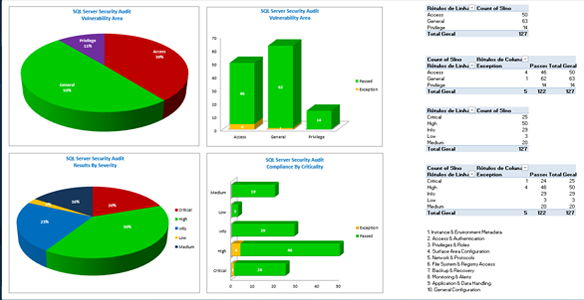
- Workbook-based audit status, severity, exceptions, supporting notes, and a dashboard embedded in the Word report.
Key Capabilities
- Read-only collection – Collects SQL Server information without applying instance or host configuration changes. Host inventory uses Windows CIM/WMI; xp_cmdshell is not required or enabled.
- Formal delivery package – Automatically produces a Word post-installation report, an Excel audit workbook, and an HTML configuration annex in a timestamped report folder.
- Automated report population – Fills environment and audit fields from collected data, embeds an audit dashboard in Word, and validates expected report-variable population.
- Availability Group comparison – Discovers replica names where possible, collects reachable replicas, and highlights configuration differences in a side-by-side HTML view.
- Detailed instance inventory – Collects service, security, networking, performance, storage, SQL Agent, and other instance-level configuration details.
- Configuration reference – Includes a reference section for recreating selected non-default SQL Server configuration. Generated statements are documentation and are not executed by the collector.
- Independent configuration collector – The instance inventory script can be run separately to produce HTML, JSON, and per-section CSV exports. Optional dbatools-based export is available when explicitly enabled.
- Operational traceability – Records execution progress, warnings, failures, and report-generation results in a separate log folder.
Generated Reports
- SQLServer_Audit_Report_<Instance>.docx – Formal post-installation and hardening report with an automatically populated environment and delivery summary and an embedded audit dashboard.
- AnnexA_SQLServer_Audit.xlsx – Detailed audit workbook containing collected values, validation fields, statuses, exception and severity categories, and supporting notes.
- AnnexB_SQLServer_Configuration.html – Self-contained SQL Server instance configuration baseline. When an Availability Group is detected, the report can show side-by-side information for reachable replicas.
The final delivery folder is created under Reports with an instance-specific name and timestamp. Temporary collector JSON/CSV data and the dashboard image are used to build the package but are not retained in that final delivery folder. Execution logs are kept separately under Logs.
Main PowerShell Components
Audit package and report generation
- Get_SQLServer_Audit_Report.cmd – Optional Windows command-file launcher. Set the target SQL instance before running it.
- Invoke-SqlServerAuditPackage.ps1 – Orchestrates audit collection, report generation, Word and Excel population, configuration-annex creation, and final package validation.
- SQLServer_Audit.sql – Defines the SQL Server audit inventory used to populate the audit workbook and report summary.
- Convert-AnnexBSqlToReadOnlySafe – Removes any executable xp_cmdshell host-inventory calls from the SQL text held in memory and rejects remaining executable calls.
- Get-AnnexBHostInventory – Collects Windows host details through CIM/WMI, including disk capacity, SQL Browser status, and applicable cluster information.
- Export-AnnexBAndAnnexA – Populates the Excel audit template directly through its Office Open XML package and generates the dashboard image without Excel automation.
- New-InstanceConfigurationAnnex – Runs the configuration collector and places its HTML output into the final report as Annex B.
- Get-WordEnvironmentSummary – Builds the environment and delivery summary from the collected SQL audit and instance configuration data.
- New-WordReportFromTemplate – Populates the Word template and embeds the audit dashboard without requiring Microsoft Word automation.
Instance configuration collector
- Invoke-SqlInstanceConfiguration.ps1 – Collects a read-only baseline for supplied SQL Server instances or instances discovered locally.
- Get-LocalSqlInstances – Discovers local SQL Server instances through the Windows registry.
- Invoke-SqlQuery – Retrieves SQL Server configuration information using an integrated-security SQL connection.
- Get-RebuildBaselineRows – Organizes relevant non-default and operational configuration into report sections.
- ConvertTo-ComparisonHtmlTable – Builds HTML tables for single-instance and side-by-side replica configuration views.
- Get-RecreateScriptSections – Generates reference SQL scripts for selected non-default configuration items; these are not applied during collection.
- Invoke-DbaToolsInstanceExport – Provides an optional separate instance export when the compatible dbatools module is installed and the export switch is enabled.
System Requirements
- Windows host with Windows PowerShell 5.1 or PowerShell 7 on Windows.
- Windows-authenticated connectivity to the target SQL Server instance and sufficient permissions to query the audit and configuration information.
- Remote CIM/WMI access to the SQL Server host for Windows inventory; unavailable host data may be reported as such.
- All six package files in the same project folder, unless alternative template and script paths are supplied to the main PowerShell script.
- Microsoft Word and Excel desktop applications are not required for report generation.
- The dbatools module is not required for the standard three-file audit package; its instance-export feature is optional in the independent configuration collector.
Configuration and Execution
Update the SQL_INSTANCE variable in Get_SQLServer_Audit_Report.cmd, or run Invoke-SqlServerAuditPackage.ps1 directly with the -SqlInstance parameter. The target can be a named instance with a TCP port, for example SERVER\INSTANCE,PORT. The main script also accepts optional paths for templates, collectors, report and log folders, and a command timeout.
The script verifies the required input files, collects the audit data, supplements host information through CIM/WMI, generates the Excel workbook, builds the HTML configuration annex, populates the Word report, and checks that the expected final documents and report variables were generated.
The independent configuration collector accepts -SqlInstance for explicit targets, -Discover for local instance discovery, -NoOpen to suppress automatic opening of the HTML report, and -EnableDbaToolsExport for an optional additional export.
Audit Interpretation
- This package documents configuration and supports an audit review; it does not itself implement security hardening or remediate findings.
- Not every entry in the SQL audit template is independently verified by a live query. Some entries are predefined or require confirmation against the actual environment and organizational policy.
- Audit statuses, exceptions, and severity classifications should be reviewed by a DBA before the report is used as formal compliance evidence.
- Availability Group comparison is limited to replicas that the collector can discover and reach with the available permissions.
