
NetWorker SQL Server Restore Script
NetWorker SQL Server Restore Helper
Overview
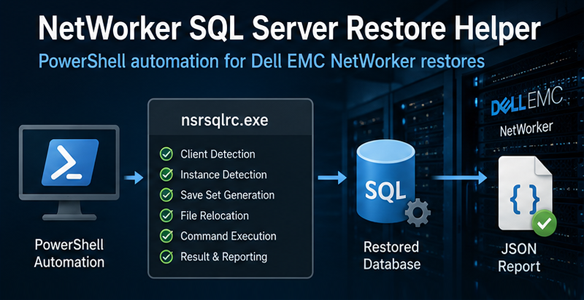
The NetWorker SQL Server Restore Helper is a PowerShell utility that simplifies Microsoft SQL Server database restores performed through Dell EMC NetWorker (nsrsqlrc.exe).
The script automates command generation, validates configuration parameters, supports multiple restore scenarios and produces a structured JSON report containing all execution details.
It is designed to provide a safer, faster and repeatable restore process while reducing manual intervention and minimizing the risk of configuration errors.
Main Features
- Restore one or multiple SQL Server databases.
- Supports RESTORE_EXISTING_DB mode.
- Supports RESTORE_NEW_DB mode.
- Supports Latest Recovery.
- Supports Point-in-Time Recovery (PIT).
- Automatic NetWorker client detection.
- Automatic SQL instance detection.
- Automatic Save Set generation.
- Automatic database file relocation for new database restores.
- Optional overwrite of existing databases.
- Preview mode without executing the restore.
- Stop-on-first-error option.
- Structured JSON execution report.
- Detailed execution logging.
- Native NetWorker (nsrsqlrc.exe) execution.
Restore Modes
- RESTORE_EXISTING_DB
Restores the database using its original name.
This mode is typically used for disaster recovery or replacing an existing database.
- RESTORE_NEW_DB
Creates a copy of the original database using a configurable suffix.
Example: Database01 > Database01_Restore
During this process the script automatically generates the required relocation mapping so that data and log files are restored into the correct SQL Server default locations.
Restore Types
- LATEST
Restores the most recent backup available in NetWorker.
This option is typically used for complete database recovery.
- PIT — Point-in-Time Restore
Restores the database to a specific date and time.
The requested recovery point is supplied in the following format: DD/MM/YYYY HH:mm:ss
The script automatically includes the appropriate NetWorker restore parameters required for Point-in-Time recovery.
Preview Mode
Preview mode allows administrators to validate the generated restore command before execution.
When enabled:
- No restore is executed.
- The complete nsrsqlrc.exe command is displayed.
- Parameters can be reviewed before production execution.
- Ideal for Change Requests and Disaster Recovery planning.
Automatic Configuration
The script automatically determines several configuration values to reduce manual input:
- SQL Server instance information.
- NetWorker client name.
- Save Set name.
- Database logical file names.
- File relocation mapping.
- Destination database names.
- JSON report file name.
- Execution identifiers.
This significantly reduces the possibility of typing mistakes during restore operations.
JSON Execution Report
Every execution generates a structured JSON report containing the complete restore information.
The report includes:
- Execution ID.
- Execution date and time.
- SQL Server instance.
- NetWorker server.
- NetWorker client.
- Restore mode.
- Restore type.
- Point-in-Time value (when applicable).
- Preview mode status.
- Overwrite option.
- Restored databases.
- Generated restore command.
- Execution result.
- Error details.
- Overall execution summary.
The JSON report can be archived as operational evidence or attached to Change Requests and Disaster Recovery documentation.
Generated Output
During execution the script displays:
Restore configuration summary.
NetWorker environment information.
Generated restore command.
Database processing status.
Success or failure messages.
JSON report location.
Final execution summary.
Benefits
- Eliminates manual construction of NetWorker restore commands.
- Standardizes SQL Server restore procedures.
- Reduces operational errors.
- Supports repeatable Disaster Recovery procedures.
- Produces consistent execution evidence.
- Simplifies Change Management validation.
- Supports both production recovery and restore testing.
- Improves DBA productivity through automation.
Requirements
- Microsoft SQL Server.
- Dell EMC NetWorker Client installed.
- nsrsqlrc.exe available on the server.
- SQL Server connectivity.
- Appropriate SQL Server permissions.
- Appropriate NetWorker restore permissions.
- Access to the required backup sets.
Important Notes
For SQL Server Always On Availability Groups, the NetWorker client should reference the physical SQL Server node rather than the Availability Group Listener.
For RESTORE_NEW_DB, the script retrieves logical file information directly from SQL Server to automatically generate the required relocation mapping.
Preview mode is recommended before executing production restores.
Version History
Version 1.0
- Initial release.
- Support for RESTORE_EXISTING_DB.
- Support for RESTORE_NEW_DB.
- Latest Recovery support.
- Point-in-Time Recovery support.
- Automatic NetWorker client detection.
- Automatic Save Set generation.
- Automatic file relocation.
- JSON execution reporting.
- Preview mode.
- Native nsrsqlrc.exe execution.
