
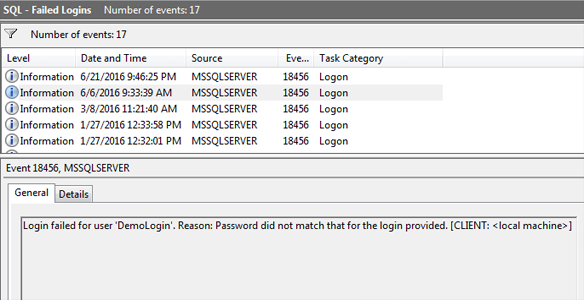
Automated creation of SQL Server-specific Event Viewer Custom Views to simplify monitoring, troubleshooting, and operational support.
This PowerShell solution automatically discovers installed SQL Server event providers and creates dedicated Event Viewer Custom Views for SQL Server-related events. Instead of manually filtering thousands of Windows Application log entries, administrators gain immediate access to categorized SQL Server Information, Warning, Error, and Critical events.
The solution creates a dedicated SQLServer Events folder within Windows Event Viewer and generates XML-based Custom Views that automatically filter events generated by SQL Server components. This significantly reduces event log noise and provides a centralized location for SQL Server operational monitoring.
By organizing events according to severity levels, DBAs and system administrators can quickly identify issues, review warnings, investigate failures, and monitor SQL Server health without creating custom filters manually.
Why This Is Needed
In most environments, SQL Server events are mixed with thousands of Windows Application log entries generated by:
- Operating system services
- Backup software
- Monitoring agents
- Antivirus products
- Third-party applications
- Other Microsoft services
Finding relevant SQL Server events often requires manual filtering, which increases troubleshooting time and may cause critical events to be overlooked.
This automation creates dedicated SQL Server event views that immediately display only SQL-related events, allowing administrators to focus on actionable information.
Key Capabilities
- Automatic SQL Server event provider discovery
- Dedicated SQL Server Event Viewer folder creation
- Severity-based event categorization
- Automatic generation of XML custom views
- Centralized SQL Server event monitoring
- Noise reduction from Windows Application logs
- Simplified troubleshooting workflow
- Standardized monitoring across SQL Server environments
- Automatic replacement of existing views when updated
Custom Views Created
- SQL Server Information: Displays informational events generated by SQL Server services and components.
- SQL Server Warning: Displays warning events that may require administrator attention.
- SQL Server Error: Displays SQL Server errors affecting normal operation.
- SQL Server Critical: Displays critical events requiring immediate investigation.
Functions Performed
- Creates the SQLServer Events folder in Event Viewer.
- Detects installed SQL Server event providers automatically.
- Builds provider-based event filters.
- Creates Information event views.
- Creates Warning event views.
- Creates Error event views.
- Creates Critical event views.
- Generates XML-based Event Viewer configuration files.
- Updates existing views when necessary.
Benefits
- Accelerates SQL Server troubleshooting.
- Improves operational visibility.
- Reduces time spent filtering logs manually.
- Standardizes event monitoring across servers.
- Helps identify issues before they impact production workloads.
- Simplifies root cause analysis during incidents.
- Provides a cleaner monitoring experience for DBAs and support teams.

