
SQL Server Local Backup Restore Automation
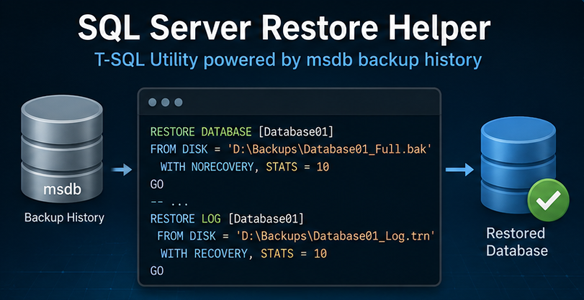
This T-SQL restore framework simplifies local SQL Server database recovery by automatically discovering the appropriate backup chain from msdb history and generating the required RESTORE commands for each selected database. It supports both restoration over the original database and restoration as a new database with automatic file relocation.
The framework can recover to the latest available backup state or to a specific point in time. A Preview mode allows the full restore sequence to be generated and reviewed before execution, while per-database result tracking records the selected restore target, effective recovery time, number of backup steps, duration and any failure details.
The automation covers
- RESTORE_EXISTING_DB mode for restoring over the original database name.
- RESTORE_NEW_DB mode for restoring to a new database name.
- LATEST restore mode using the latest available valid backup chain.
- Point-in-Time (PIT) restore mode using a requested date and time.
- FULL, Differential and Transaction Log backup-chain discovery from msdb.
- Automatic selection of the latest FULL backup valid for the requested restore time.
- Differential backup matching using database_backup_lsn and the selected FULL backup checkpoint LSN.
- Ordered transaction log restore sequence following the selected FULL or Differential base.
- STOPAT generation for the final applicable transaction log in PIT mode.
- Automatic discovery of SQL Server default Data and Log paths.
- RESTORE FILELISTONLY analysis of the selected FULL backup.
- Automatic WITH MOVE generation for RESTORE_NEW_DB.
- Support for multiple databases in one execution.
- Optional drop of an existing target database before restore.
- Preview-only mode for command generation without destructive execution.
- Per-database TRY/CATCH error handling with optional stop-on-first-error behavior.
- Execution timing, backup-step counts, per-database status and overall result calculation.
- Complete generated RESTORE commands available in the SSMS Results tab.
- Structured JSON execution reporting in the reporting variant.
Restore modes
- RESTORE_EXISTING_DB – Restores the selected backup chain using the original database name.
- RESTORE_NEW_DB – Restores the same backup chain under a new database name using the configured suffix and automatically generated WITH MOVE clauses.
Restore types
- LATEST – Determines the latest available restore point from msdb backup history and builds the appropriate FULL, Differential and Log sequence.
- PIT – Uses the requested point-in-time value and generates a restore chain ending with STOPAT on the applicable final transaction log.
Backup-chain discovery
For each source database, the script reads msdb.dbo.backupset and msdb.dbo.backupmediafamily. It selects the latest FULL backup that completed before the effective restore time, optionally selects the latest compatible Differential backup whose database_backup_lsn matches the FULL backup checkpoint LSN, and then appends the applicable Transaction Log backups in restore order.
Automatic file relocation
When RESTORE_NEW_DB is selected, the framework automatically discovers the SQL Server instance default Data and Log paths. It reads the logical files from the selected FULL backup using RESTORE FILELISTONLY and generates a WITH MOVE clause for every present database file. Data and log files are renamed consistently using the target database name.
Preview and controlled execution
- PreviewOnly = 1: The restore chain and complete RESTORE statements are generated, but no restore operation is executed.
- PreviewOnly = 0: The generated commands are executed in the calculated restore order.
- DropTargetIfExists: Optionally places an existing target database in SINGLE_USER mode and drops it before restore.
- StopOnFirstError: Controls whether processing stops immediately after the first failed database.
Local_Restore.sql
The core script provides the restore engine. It validates the selected options, discovers the backup chain, builds any required WITH MOVE clauses, generates or executes the restore sequence, and returns an overall summary, per-database result details and the complete generated RESTORE commands in SSMS.
Local_Restore_JSON_Report.sql
The JSON-reporting variant extends the same restore workflow with structured execution metadata. The report includes the execution ID, server and instance information, execution timing, restore mode and type, overall status and database-level results.
For each database, the reporting variant records the source and target database names, result, message, duration, effective restore time, backup-step count and any reported error. The complete RESTORE statements remain available separately in the SSMS Results tab.
Recommended workflow
- 1 – Select restore mode: Choose RESTORE_EXISTING_DB or RESTORE_NEW_DB.
- 2 – Select restore type: Choose LATEST or PIT and, for PIT, provide the required point-in-time value.
- 3 – Define scope: Add the required databases to the database list.
- 4 – Preview: Run with PreviewOnly = 1 and review the generated chain and commands.
- 5 – Validate: Confirm the selected backup files, restore order, target database names and generated file locations.
- 6 – Execute: Set PreviewOnly = 0 only when ready to perform the restore.
- 7 – Review results: Review the overall result, per-database status, effective restore time, backup-step count and any reported errors.
Important operational considerations
- Preview mode should be used before destructive execution to confirm the generated restore sequence.
- RESTORE_NEW_DB automatically relocates files based on the SQL Server instance default Data and Log paths.
- PIT recovery depends on valid backup history and an applicable transaction-log chain for the requested point in time.
- DropTargetIfExists is destructive and can place an existing target database in SINGLE_USER mode before dropping it.
- The restore chain is built from msdb backup history, so the required backup files must still be available at the recorded paths.
- The JSON-reporting variant complements, rather than replaces, the detailed RESTORE command output available in SSMS.
