SQL Server Logins Synchronization
Synchronizing SQL Server logins is essential for maintaining consistent security and access control across multiple SQL Server instances—especially in environments that rely on high availability, disaster recovery, or distributed workloads. Without proper synchronization, users may experience login failures, mismatched permissions, or unexpected access issues when failovers or migrations occur.
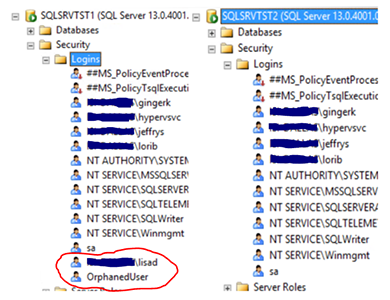
When a login exists on one instance but not on another, or when its SID, permissions, or server roles differ, SQL Server treats it as a completely different identity. This leads to orphaned users, broken applications, and operational disruptions.
A reliable synchronization process ensures that all logins, permissions, server roles, and database users remain perfectly aligned between servers.
SQL Server Logins Synchronization replicates and synchronizes:
- Logins
- Server‑level permissions
- Server roles
- Database users and mappings
between two SQL Server instances, guaranteeing complete, deterministic, and repeatable alignment.
- Source: @SourceServer (a linked server pointing to the AOAG listener or primary node)
- Target: The instance where the procedure is executed
This ensures that both environments remain identical from a security and access perspective.
|
Blocks description:
- Cleans temporary objects and creates the base temporary tables.
Prepares the environment for synchronization.
- Loads logins from source and target servers, including:
- SID
- password_hash
- default database
- default language
- CHECK_POLICY / CHECK_EXPIRATION
- status (enabled/disabled)
- Synchronizes logins:
- Creates missing logins on the target (with SID and password hash)
- Removes logins that exist on the target but not on the source
- Synchronizes general login properties:
- DEFAULT_DATABASE
- DEFAULT_LANGUAGE
- CHECK_POLICY
- CHECK_EXPIRATION
- ENABLE / DISABLE
- Synchronizes server role membership (sysadmin, securityadmin, etc.)
- Adds missing members
- Removes extra members
- Synchronizes server and endpoint permissions (securables tab):
- Class 100: server permissions
- Class 105: endpoint permissions
- Fully mirrors: GRANT/DENY according to source, REVOKE extras
- Applies missing GRANT/DENY permissions on the target.
- Removes extra permissions on the target (REVOKE).
- Synchronizes the “CONNECT SQL” permission (Status tab):
- GRANT CONNECT SQL
- DENY CONNECT SQL
- Mirrors exactly the state of the source server.
- Builds the list of common databases (user databases)
for user synchronization.
- Loop through each common database:
- Loads users (source/target)
- Synchronizes users (create/remove)
- Synchronizes database role membership
- Final comparison between servers:
- Logins existing only on one side
- Differences in general properties
- Differences in roles
- Differences in server permissions
- Differences in CONNECT SQL
|
Create Linked Server - both nodes [LoginSync]:
USE master;
GO
EXEC master.dbo.sp_addlinkedserver
@server = N'LoginSync',
@srvproduct = N'',
@provider = N'MSOLEDBSQL',
@datasrc = N'LISTENER,PORT';
GO
EXEC master.dbo.sp_addlinkedsrvlogin
@rmtsrvname = N'LoginSync',
@useself = N'True';
GO
Create Job - both nodes [DBA_Syncronize_Logins]:
USE msdb;
GO
-- 1. Create the job
EXEC dbo.sp_add_job
@job_name = N'DBA_Syncronize_Logins',
@enabled = 1,
@description = N'DBA: dbaemail';
GO
-- 2. Add a job step to execute the procedure
EXEC dbo.sp_add_jobstep
@job_name = N'DBA_Syncronize_Logins',
@step_name = N'Run Syncronize_Logins',
@subsystem = N'TSQL',
@command = N'EXEC dbo.Syncronize_Logins @SourceServer = N''LoginSync'';',
@database_name = N'master';
GO
-- 3. Create a DAILY schedule (runs once per day at 02:00 AM)
EXEC dbo.sp_add_schedule
@schedule_name = N'Syncronize_Logins Daily Schedule',
@freq_type = 4, -- daily
@freq_interval = 1, -- every 1 day
@active_start_time = 020000; -- 02:00 AM
GO
-- 4. Attach the schedule to the job
EXEC dbo.sp_attach_schedule
@job_name = N'DBA_Syncronize_Logins',
@schedule_name = N'Syncronize_Logins Daily Schedule';
GO
-- 5. Register the job on the local SQL Server Agent
EXEC dbo.sp_add_jobserver
@job_name = N'DBA_Syncronize_Logins';
GO
|
Execution:
- EXEC dbo.Syncronize_Logins @SourceServer = N'LoginSync'
- EXEC dbo.Syncronize_Logins @SourceServer = N'LoginSync', @Debug = 1