SQL Server Custom Reports
SQL Server Management Studio (SSMS) Information Custom Reports
SSMSInfoReports is a collection of custom .rdl reports that enhance SQL Server Management Studio’s built‑in reporting features. They offer a consolidated, visual way to inspect SQL Server instances without the need to run multiple manual queries.
The package includes 18 reports designed to give a rapid, comprehensive overview of an instance and its databases, making it easier to answer key diagnostic questions when assessing a new server or environment.
While the default SSMS reports are helpful, they do not provide this level of summary detail and often omit advanced information that is only accessible through custom queries. Using reports instead of raw queries also brings practical advantages, such as the ability to export or print results.
SSMSInfoReports delivers a fast, graphical snapshot of configuration, storage, backups, SQL Agent jobs, security, performance, and more, offering far greater depth than the standard SSMS reports. The full set is available on GitHub and can be executed directly within SSMS.
Reports information:
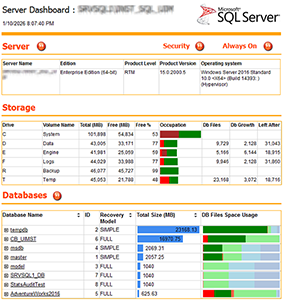
- Server information : version, edition, build, os platform, hardware, services, configuration options, memory configuration, security, etc…
- Storage : disk allocated, file sizes and allocation for all databases
- Last errors in SQL Server errorlog
- Logins, roles, users, permissions (new in v8)
- SQL Agent jobs information and history
- Always On Availability Groups information
- Performance information : wait states, cpu, memory usage and main performance counters, io latency, tempdb utilization, etc…
- Databases informations : database options, storage allocation, transaction logs and backups information, mixed collations, objects information, etc...
- Tables and index informations : primary keys (clustered, nonclustered, no primary key), unique constraints, existing indexes, tables without index, size of index keys, etc…
TSQL scripts of these reports are coming from various sources : my own scripts and some other inspired by well known SQL Server experts.
Reports description:
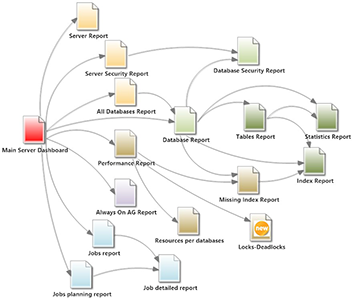
- Main Server Dashboard.rdl : main information and starting point, other reports are linked to this one (but they can be used also separately).
- Server Report.rdl : instance information
- Server Security Report.rdl : instance security information
- Always On Report : availability groups information, new in V7
- All Databases Report.rdl : databases overview
- Server Performance.rdl : instance performance informations
- Resources per database.rdl : resources per database informations
- Locks-Deadlocks.rdl : lock waits and deadlocks information
- Database Report.rdl : general database information. Could also to be run from a database in object explorer.
- Database Security Report.rdl : database security information. Could also to be run from a database in object explorer.
- Tables Report : tables informations. Could also to be run from a database in object explorer.
- Index Report : index informations. Could also to be run from a database or a single table object in object explorer.
- Statistics Report : informations about columns and index statistics. Could also to be run from a database, a single table or a single statistic.
- Missing Index Report : show missing index, for one or for all databases
- Query Store Report (new) : show top 50 queries in the last 4 hours (for query store enabled databases)
- Jobs report : a dashboard for monitoring jobs execution and performance
- Jobs history planning report : shows history of last 24 hours, new in V7
- Job detailed report : detailed information, could also be run from a single job in SSMS
Reports are linked to each other and the top report is "Main Server Dashboard.rdl":